Hi
This is a local ontology, not a common one, so you'll need to modify it yourself within your local ontology. As a community, we only modify common definitions.
And, yes I can help you to do this change. 😉
1 Login as root.
2 You will see the ontology menu, click in the Ontology to see the ontology tree.
3 Locate your local ontology tree, you can search with your local tld = storykitchen and the id = 1
4 See the tree and locate the storykitchen64 inside the ontology tree
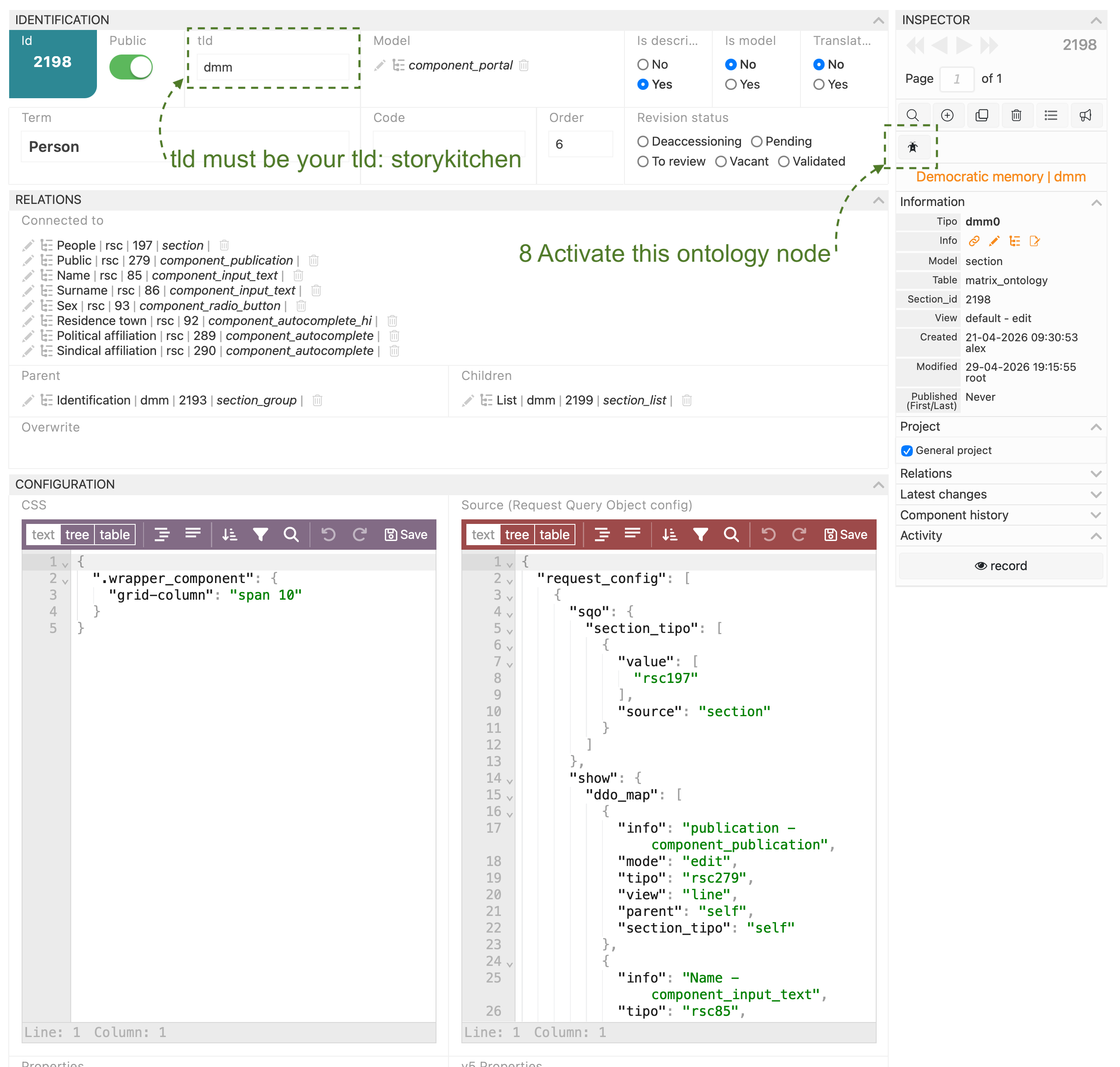
5 Create a new ontology node and set Term as Person (or the name that you want) the Model with component_portal and set your TLD into the tld field: storykitchen.
6 Set is description as Yes, Is model as No, and Translatable as NO.
7 Set Connected to pointing to rsc197 People and the name rsc85 and surname rsc86 but you can add the People section componentes that you want.
8 If you want more control and you are in any version > v6 you can set the RQO json with this:
{
"request_config": [
{
"sqo": {
"section_tipo": [
{
"value": [
"rsc197"
],
"source": "section"
}
]
},
"show": {
"ddo_map": [
{
"info": "publication - component_publication",
"mode": "edit",
"tipo": "rsc279",
"view": "line",
"parent": "self",
"section_tipo": "self"
},
{
"info": "Name - component_input_text",
"tipo": "rsc85",
"parent": "self",
"section_tipo": "self"
},
{
"info": "Surame - component_input_text",
"tipo": "rsc86",
"parent": "self",
"section_tipo": "self"
},
{
"info": "Sex - component_radio_button",
"tipo": "rsc93",
"parent": "self",
"section_tipo": "self"
},
{
"info": "Residence place - component_autocomplete_hi",
"tipo": "rsc92",
"view": "line",
"width": "2fr",
"parent": "self",
"section_tipo": "self"
},
{
"info": "political filiation - component_autocomplete",
"tipo": "rsc289",
"view": "line",
"parent": "self",
"section_tipo": "self"
},
{
"info": "sindical filiation - component_autocomplete",
"tipo": "rsc290",
"parent": "self",
"section_tipo": "self"
}
]
},
"search": {
"ddo_map": [
{
"info": "Name - component_input_text",
"tipo": "rsc85",
"parent": "self",
"section_tipo": "self"
},
{
"info": "Surame - component_input_text",
"tipo": "rsc86",
"parent": "self",
"section_tipo": "self"
}
],
"sqo_config": {
"limit": 30
},
"fields_separator": ", "
}
}
]
}
8 When the new component is set correctly, press the activation button to activate it into the ontology, and reload the section to see your changes.
It set the search inside the component and more clear definition about how the component works.
This is a screen shot of one term calling to People, I hop it helps.
if you have questions... you know.
Best
