Dear colleagues,
Here at CENOMI, we would like to highlight an issue that arises when creating new records in the “Census of reprisals (deprecated)”, but which may also affect other sections.
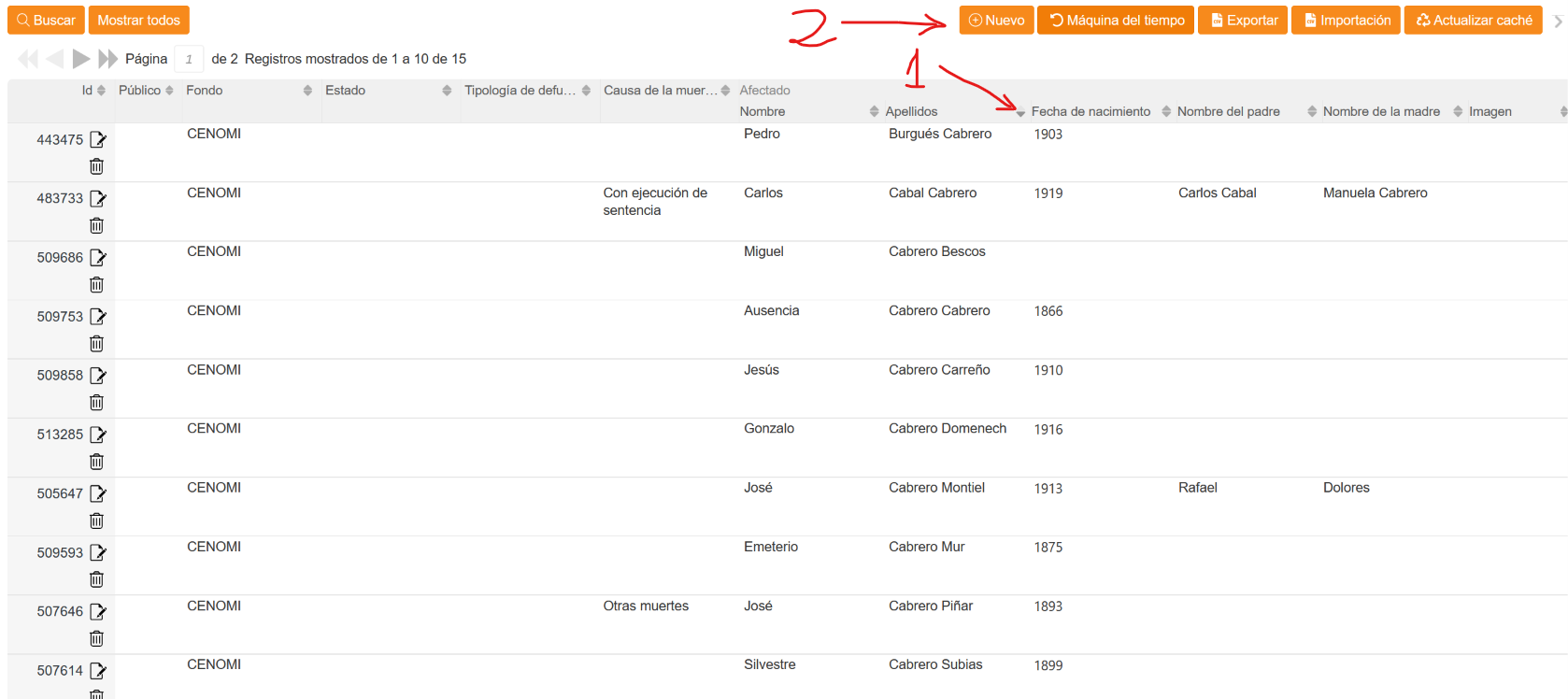
In the project, we have reached a stage where we must first check all the victims we enter manually to avoid duplicates. We do this using the search function in the census and dragging the “surname” field of the “Affected” victim. Here we search for one or two surnames and cross-check the results. The image below shows one of these searches, specifically for the surname Cabrero. If we don’t see a match, we create a new record; a window opens, we fill in the details, and we’re done. However, there is a ‘problem’ when we sort the results by surname. If we follow the exact sequence of sorting by surname (we do this to make cross-checking easier when we have several results) and then, seeing that there are no matches, create a new record (1 and 2 in screenshot 1), the application displays a ‘No records found’ message (2nd screenshot). In other words, instead of opening a new window with the census record straight away – which is the usual procedure – that message appears. The census record is created anyway, but the user has to go and find it in the census by navigating to the most recently created ID. There, the record appears blank, but if this process is ignored, it is easy to overlook it and leave it empty. This makes it slightly more difficult to fill in the data automatically, as you have to return to the list of census records that have been created. If the search is not sorted by surname, this does not happen. We do not know whether sorting the data according to other criteria also causes this issue, but in the case described, it occurs 100 per cent of the time.
Kind regards,
Team CENOMI.
Estimados compañeros,
Desde CENOMI comentamos una cuestión que ocurre al crear fichas nuevas en el censo obsoleto pero que tal vez afecte a otras secciones.
En el proyecto hemos llegado a un punto en el que debemos comprobar previamente todas las víctimas que colocamos a mano para evitar duplicados. Esto lo hacemos a partir de la búsqueda del censo obsoleto, arrastrando el campo de apellidos de afectado. Ahí buscamos uno o dos apellidos y hacemos un cotejo con los resultados. La imagen de abajo es una de estas búsquedas, en concreto para el apellido Cabrero. Si no vemos una coincidencia creamos una ficha nueva, se abre una ventana, completamos datos y listo. No obstante, hay un “problema” cuando ordenamos los resultados por apellidos. Si hacemos exactamente la secuencia de ordenar por apellidos (lo hacemos para facilitar el cotejo cuando tenemos varios resultados) y luego, viendo que no hay coincidencias, creamos una nueva ficha (1 y 2 en la captura 1) la aplicación da como resultado un mensaje de “No records found” (2ª captura). Es decir, en lugar de abrir una nueva ventana con ficha de censo directamente, que es lo habitual, aparece ese mensaje. La ficha de censo se crea igualmente, pero hay que ir a buscarla al censo yendo al último ID creado. Ahí está nuestra ficha en blanco, pero si ignoramos el proceso, es fácil olvidarla y que quede vacía. Esto hace un poco más difícil cubrir los datos automáticamente, ya que hay que volver a la lista de fichas de censo creadas. Si no se ordena la búsqueda por apellidos, esto no pasa. Desconocemos si ordenando los datos de acuerdo a otros criterios la situación también se reproduce, pero en el caso descrito ocurre el 100% de las veces.
Saludos cordiales,
Equipo CENOMI
1
2

